These bluedriver obd2 bluetooth scanner reviews focus on a compact tool for drivers who want to investigate warning lights with a phone or tablet.
BlueDriver pairs wireless convenience with enhanced diagnostics and repair reports, though vehicle compatibility and the usefulness of each function depend on the car.
BlueDriver Scanner Review Summary
The quick verdict
63,000+ ratings
Read Amazon ReviewsBlueDriver OBD2 Scanner
A fit for DIY car owners who want Bluetooth diagnostics, broader system access, and repair guidance without recurring subscription fees.
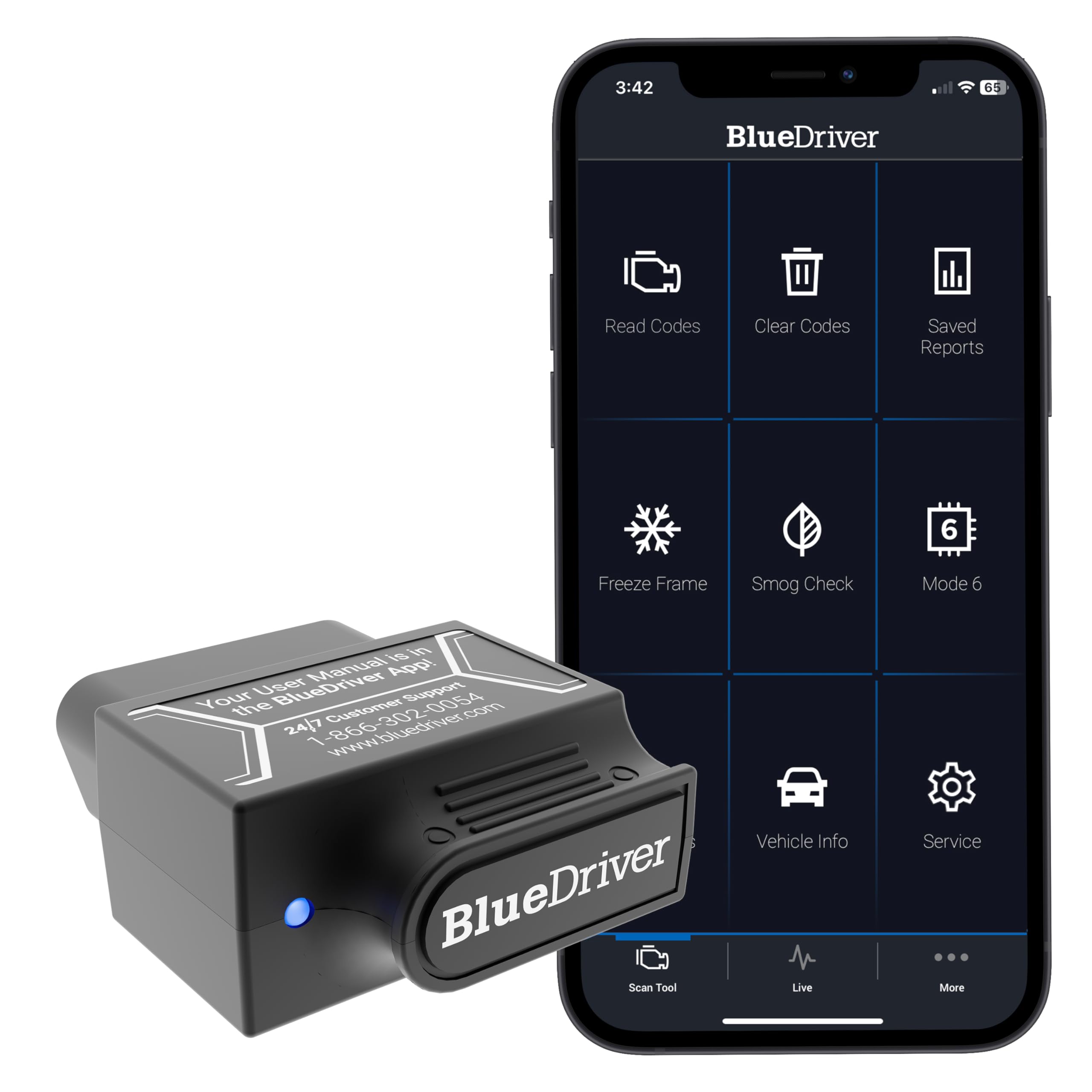
- Connects via Bluetooth to an iOS or Android phone or tablet; the sensor plugs into the vehicle’s OBDII port.
- Reads and clears more codes than a basic reader, with enhanced diagnostics listed for check engine, ABS, SRS, airbag, TPMS, and transmission systems.
- Provides live vehicle data, freeze frames, smog readiness checks, and Mode 6 test results.
- Repair reports matched to the vehicle identification number include code definitions, possible causes, and technician-verified fixes.

Pros
- Offers several diagnostic areas beyond basic engine codes, including selected safety and vehicle systems.
- Combines scan results with repair explanations and live data in a phone-based workflow.
Consider before buying
- A phone or tablet is required to use the Bluetooth-based interface, so it is not a standalone screen-equipped reader.
- The breadth of diagnostics can vary by vehicle; confirm the exact systems and functions for your make, model, and year.
Read the full review summary
BlueDriver plugs into a vehicle’s OBDII port and connects to an iOS or Android device over Bluetooth.
Its app can read and clear more than basic engine codes, with listed coverage including ABS, SRS, airbag, TPMS, and transmission diagnostics.
Live data, freeze frames, smog readiness, and Mode 6 results give DIY owners several ways to investigate a problem beyond retrieving a code.
The strongest fit is a driver who wants a portable scanner and is willing to use a phone app as the interface.
Repair reports matched to the VIN include definitions, possible causes, and verified fixes, which may help make a code easier to interpret.
The product is described for gas vehicles from 1996 onward sold in North America, but buyers should confirm the specific systems and functions available for their vehicle before relying on them.
The buying factors
BlueDriver Scanner Scorecard
Editorial scores reflect listed features and buyer fit; they are not laboratory measurements or customer ratings.
Diagnostic range
The listed systems extend beyond basic check-engine code reading, with ABS, SRS, airbag, TPMS, and transmission access.
Repair guidance
VIN-matched reports include code definitions, causes, and technician-verified fixes, giving DIY owners context alongside codes.
Live monitoring
Live vehicle data, freeze frames, smog readiness, and Mode 6 results support more detailed troubleshooting.
Wireless convenience
The small port-connected sensor communicates with a phone or tablet over Bluetooth, avoiding a tethered handheld reader.
Vehicle coverage clarity
Broad support is described for many makes, and the stated general scope is North American gas vehicles from 1996 onward; exact system coverage still merits checking.
Ownership costs
The described purchase includes full feature access and app updates without subscription fees or add-ons.
Key Features and Specifications of BlueDriver Scanner
- Connects via Bluetooth to an iOS or Android phone or tablet; the sensor plugs into the vehicle’s OBDII port.
- Reads and clears more codes than a basic reader, with enhanced diagnostics listed for check engine, ABS, SRS, airbag, TPMS, and transmission systems.
- Provides live vehicle data, freeze frames, smog readiness checks, and Mode 6 test results.
- Repair reports matched to the vehicle identification number include code definitions, possible causes, and technician-verified fixes.
- Designed for gas-powered vehicles from model year 1996 onward sold in the United States, Canada, and Mexico; support is highlighted for numerous North American, Asian, and European makes.
- Includes access to the BlueDriver app, with no subscription fees or add-ons described and free app updates.
Pros and Cons of BlueDriver Scanner
Pros
- Offers several diagnostic areas beyond basic engine codes, including selected safety and vehicle systems.
- Combines scan results with repair explanations and live data in a phone-based workflow.
- Compact Bluetooth sensor avoids carrying a larger wired handheld scanner.
- No recurring subscription fee is described for accessing its features.
Consider before buying
- A phone or tablet is required to use the Bluetooth-based interface, so it is not a standalone screen-equipped reader.
- The breadth of diagnostics can vary by vehicle; confirm the exact systems and functions for your make, model, and year.
- It is aimed at gas-powered North American vehicles from 1996 onward, so buyers with other vehicle types or markets should verify fit before purchase.
Who Should Buy BlueDriver Scanner?
Good fit
Consider BlueDriver if you want to check warning codes yourself and prefer reading results on a phone.
Its combination of enhanced system access, live data, freeze frames, and VIN-matched repair reports is useful for owners who want more context than a basic code-and-clear tool provides.
The compact sensor also suits a glovebox kit or occasional home troubleshooting.
It is especially worth considering when you want the included app features without a recurring subscription.
Before buying, check BlueDriver’s compatibility information for your particular vehicle and the diagnostic systems you care about; broad make support does not guarantee every function works on every model.
Who should skip it
Choose another style of scanner if you need a built-in display or prefer a handheld device that does not depend on pairing with a phone or tablet.
Skip it if your vehicle falls outside the described North American gas-vehicle scope, or if you need a specific reset or service function that you have not confirmed is supported for your car.
How the BlueDriver Scanner Fits DIY Diagnostics
More context than a basic code reader
A trouble code can point toward a system or condition without settling what repair is needed. BlueDriver’s repair reports add definitions, possible causes, and verified fixes, while freeze-frame data can preserve vehicle readings associated with a fault.
That combination can help an owner prepare better questions or decide what to investigate next, but it should not be treated as a guarantee that a suggested repair will solve every case.
System access depends on the vehicle
BlueDriver lists enhanced diagnostics for engine, ABS, SRS, airbag, TPMS, and transmission systems, which gives it a broader intended role than a reader focused only on the check-engine light. Coverage can differ across vehicles, however.
If a particular system is the reason for buying, verify compatibility for the exact year, make, and model before counting on that function.
A phone-first workflow
The sensor plugs into the OBDII port, then communicates wirelessly with an iOS or Android device. This keeps the hardware small and lets the app present live readings and scan information on a device many owners already carry.
Buyers who want an integrated screen or prefer to work without a mobile device may find this arrangement less convenient.
A one-time purchase model
The included app access is described without subscription fees or add-ons, and app updates are included.
That makes ongoing access straightforward to budget for, while still leaving the initial purchase decision dependent on whether the supported diagnostics match the owner’s vehicle and repair habits.
Alternatives to BlueDriver Scanner
Battery-focused alternative
4,000+ ratings
Read Amazon ReviewsInnova 5210 OBD2 Scanner
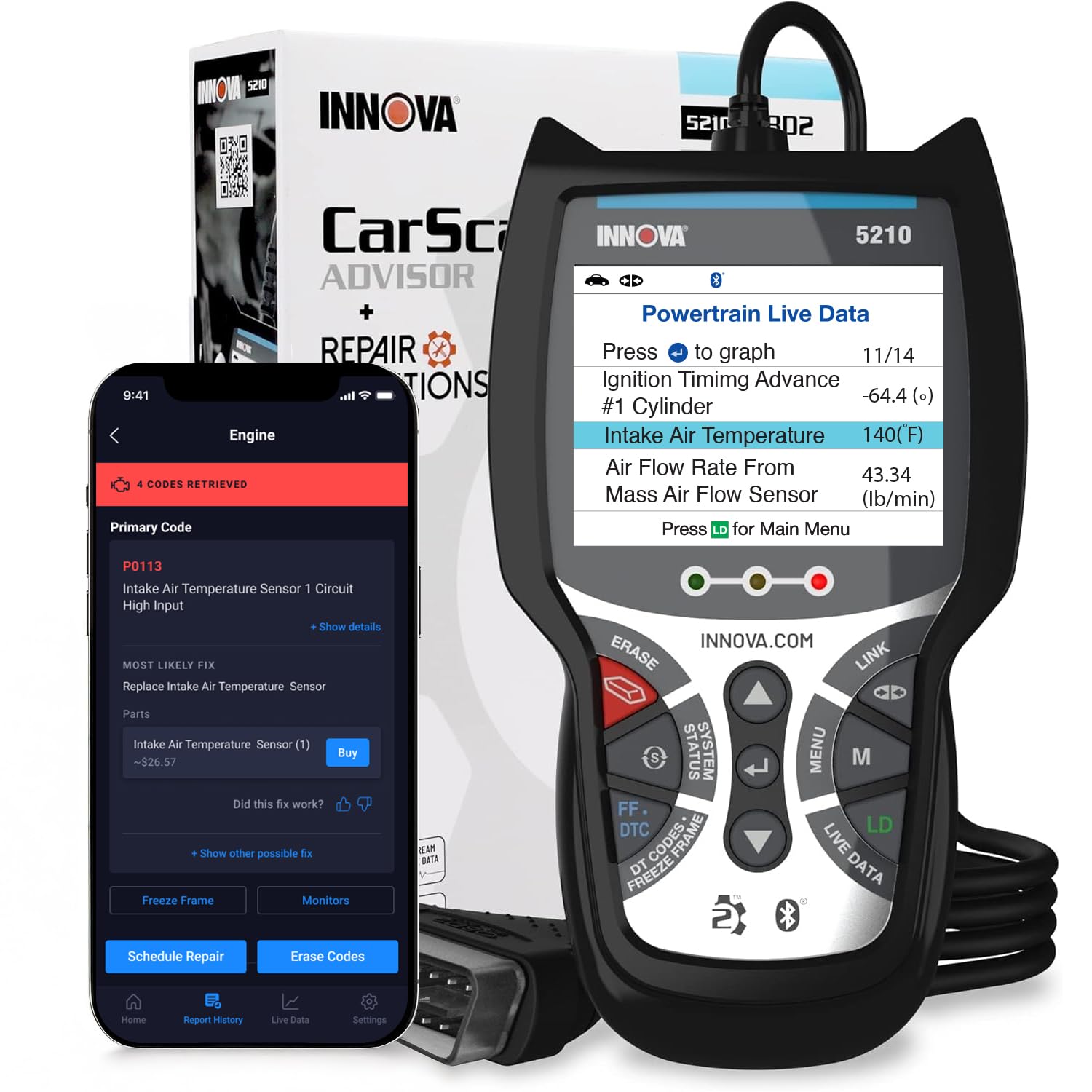
Consider the Innova 5210 if a built-in handheld scanner, battery testing, or oil-light reset better matches your routine.
BlueDriver is the closer fit if you prefer a phone-based Bluetooth setup and want its listed system diagnostics and VIN-matched reports. Check vehicle-specific coverage for either option before choosing based on a particular function.
- The Innova 5210 is a handheld OBD2 scanner that also functions as a battery tester, offers live data and an oil-light reset, and pairs with the RepairSolutions2 app for repair guidance.
- Its ABS coverage may vary by vehicle.
- BlueDriver uses a Bluetooth sensor with a phone or tablet app and emphasizes enhanced diagnostics, VIN-matched repair reports, and live data.
Is BlueDriver Scanner Worth It?
BlueDriver OBD2 Scanner is worth considering for DIY owners who want wireless access to more than basic engine codes, useful live data, and repair explanations in a phone app.
Its no-subscription access also makes the ongoing cost structure easy to understand.
The main decision is whether your vehicle supports the diagnostics you need and whether you are comfortable relying on a phone or tablet as the interface.
Confirm the specific vehicle coverage first; if it checks out, BlueDriver offers a capable, compact way to investigate warning lights and follow up with more informed repair decisions.
Your review at a glance
63,000+ ratings
Read Amazon ReviewsBlueDriver OBD2 Scanner
A fit for DIY car owners who want Bluetooth diagnostics, broader system access, and repair guidance without recurring subscription fees.
- Connects via Bluetooth to an iOS or Android phone or tablet; the sensor plugs into the vehicle’s OBDII port.
- Reads and clears more codes than a basic reader, with enhanced diagnostics listed for check engine, ABS, SRS, airbag, TPMS, and transmission systems.
- Provides live vehicle data, freeze frames, smog readiness checks, and Mode 6 test results.
- Repair reports matched to the vehicle identification number include code definitions, possible causes, and technician-verified fixes.